
Businesses are increasingly using AI for customer support, lead handling, internal knowledge, ecommerce and workflow automation. But one question comes up often: should you build an AI chatbot or an AI agent?
The difference is less about which technology is “more advanced” and more about what you need the system to actually do.
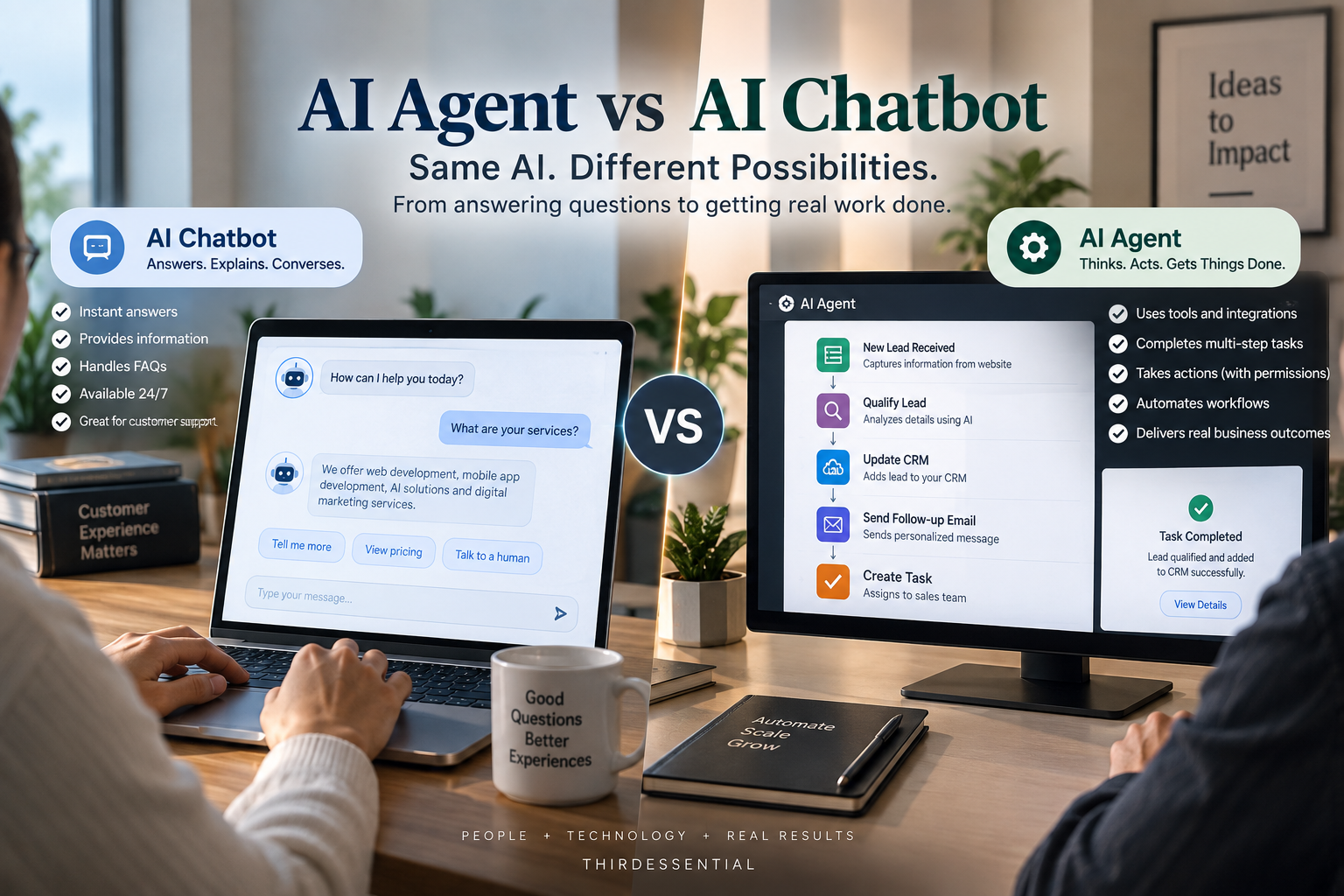
An AI chatbot is primarily designed to understand questions and provide responses. An AI agent can go further by using approved tools, accessing connected systems and completing defined multi-step tasks. The right choice depends on your workflow, integrations, risk level and expected business outcome.
AI Agent vs AI Chatbot: What’s the Difference?
The simplest way to understand the difference is:
A chatbot mainly communicates. An AI agent can communicate and perform actions.
That doesn’t mean every chatbot is limited to simple questions, or that every AI agent can operate independently. Modern chatbots can connect to databases, APIs and business systems. Similarly, agents should operate within clearly defined permissions, tools and business rules.
| Capability | AI Chatbot | AI Agent |
| Answer questions | Yes | Yes |
| Use business knowledge | Yes | Yes |
| Access external systems | Possible | Common |
| Perform multi-step tasks | Limited/depends on design | Yes |
| Take actions | Limited/depends on integrations | Yes, within permissions |
| Follow workflows | Basic to moderate | Strong |
| Human approval | Can be added | Can be built into workflow |
| Development complexity | Usually lower | Usually higher |
| Best suited for | Information and conversations | Tasks and workflow automation |
OpenAI’s current agent guidance describes an agent around three core elements: a model, tools and instructions/guardrails. Tools can provide access to data or allow actions such as updating a CRM or sending a message.
The Practical Difference: Response vs Action
Consider an ecommerce customer asking:
“Where is my order?”
A chatbot might:
- Understand the customer’s question
- Retrieve order information
- Check available shipping information
- Tell the customer the current status
That’s already useful.
An AI agent could potentially:
- Identify the customer.
- Find the relevant order.
- Check the order management system.
- Check shipping information.
- Determine whether the delivery is delayed.
- Create or update a support ticket if required.
- Escalate the issue when a defined condition is met.
- Send the customer an appropriate response.
The important point is that the agent doesn’t magically have access to these systems. The required APIs, authentication, permissions, business rules and tools have to be implemented first.
That’s why an AI agent is better understood as part of a business workflow, rather than simply a smarter chatbot.
When Is an AI Chatbot Enough?
A chatbot may be the better solution when the primary requirement is answering questions or guiding users.
Common examples include:
- Website FAQs
- Product information
- Service questions
- Basic customer support
- Lead qualification
- Appointment-related questions
- Internal knowledge lookup
- Website navigation
For example, a service company may receive hundreds of questions such as:
“Do you provide this service?”
“What are your working hours?”
“How much does this service cost?”
“How can I book an appointment?”
A well-designed AI chatbot can handle these interactions without introducing the additional complexity of an agent architecture.
Don’t build an AI agent simply because it sounds more advanced. If the business problem is answering questions, a chatbot may be all you need.
When Does an AI Agent Make More Sense?
An AI agent becomes more useful when the system needs to complete work rather than simply provide information.
Typical examples include:
Lead qualification + CRM updates
The system can collect information from a prospect, determine whether the lead meets predefined criteria and update the CRM.
Appointment scheduling
An AI system can understand the request, check availability and interact with a scheduling system when the required integrations are available.
Ecommerce operations
An agent could help handle order-related workflows, returns or support escalation according to predefined rules.
Internal business workflows
For example:
Employee request → check company policy → retrieve information → update internal system → notify the relevant person.
Document processing
An agent can potentially retrieve documents, extract information, validate data and send the output into another business process.
Research workflows
Instead of simply answering a question, an agent can be designed to gather information from approved sources, process it and produce a structured result.
The common factor is multiple steps + tools + a defined outcome.
Real-World Example: Ecommerce
Let’s make the difference even clearer.
Scenario: Customer wants to return a product
Chatbot
Customer:
“What is your return policy?”
Chatbot:
Provides the relevant return policy.
That’s a straightforward information request.
AI Agent
Customer:
“I want to return my order.”
The system could:
Customer request
↓
Identify order
↓
Check purchase date
↓
Verify return eligibility
↓
Check product/return conditions
↓
Create return request
↓
Update ecommerce system
↓
Notify customer
This requires significantly more than a conversational interface.
It may require:
- Ecommerce API
- Customer authentication
- Order database access
- Return rules
- Permission controls
- Validation
- Error handling
- Human approval for exceptions
That’s the practical distinction between answering a question and executing a workflow.
AI Agent vs Chatbot: Cost and Complexity
There isn’t one fixed price for either technology.
The actual development effort depends on what you’re connecting and what the system is expected to do.
A chatbot may require:
- AI model/API
- Chat interface
- Knowledge base
- Conversation logic
- Authentication, if required
- Business-system integrations
An AI agent may additionally require:
- Tool/API integrations
- Workflow orchestration
- Database access
- Authentication
- Permission management
- Business rules
- Monitoring
- Testing
- Guardrails
- Human approval workflows
- Error and fallback handling
The more systems an agent can access, the more important it becomes to control what it can read, what it can change and which actions require approval.
Modern agent systems are increasingly built around tools that allow models to retrieve information and perform controlled actions in external systems.
So instead of asking:
“How much does an AI agent cost?”
a better question is:
“What workflow are we automating, and which systems does the AI need to interact with?”
That gives a much more realistic basis for estimating development effort.
Do You Actually Need an AI Agent?
Use this simple decision framework.
Choose an AI chatbot if:
- You mainly need to answer questions.
- Your workflow is relatively simple.
- Users don’t need the system to perform actions.
- Your main objective is customer support or information delivery.
Consider an AI agent if:
- The system needs to complete tasks.
- Multiple systems need to communicate.
- The workflow contains several steps.
- Employees currently perform repetitive manual work.
- The AI needs to use APIs or business tools.
- Actions need to happen according to defined rules.
One important rule:
Don’t build an AI agent just because it sounds more advanced.
If a chatbot plus one well-designed API integration solves the problem, building a complex agent may add unnecessary development and maintenance overhead.
What Does an AI Agent Need to Work in a Real Business?
An AI agent is not simply an LLM with a chat window.
A production implementation may involve:
LLM
The model responsible for understanding and generating responses.
Instructions
Rules that define what the system should and should not do.
Tools
Functions or APIs the agent can use to retrieve information or perform actions.
Business systems
CRM, ecommerce platform, database, scheduling system, helpdesk or other applications.
Authentication and permissions
Controls determining what the AI is allowed to access or change.
Business rules
Rules defining what actions are allowed and when human approval is required.
Monitoring
Logs and observability to understand what the system did and identify failures.
Human approval
Important for workflows involving sensitive, expensive or irreversible actions.
This architecture is why agent development should begin with the business workflow, not simply the choice of an AI model. OpenAI’s current agent guidance similarly emphasizes models, tools and instructions/guardrails as core building blocks.
AI Agent vs AI Chatbot: Which Should You Choose?
| Business requirement | Suitable approach |
| Answer website FAQs | AI chatbot |
| Explain products/services | AI chatbot |
| Basic customer support | AI chatbot |
| Qualify leads | Chatbot or agent depending on workflow |
| Qualify leads + update CRM | AI agent |
| Check order status | Chatbot or lightweight integration |
| Process a return request | Agent + business rules/approval |
| Schedule appointments | Chatbot + scheduling integration or agent |
| Automate multi-step internal work | AI agent |
| Retrieve information from company documents | Chatbot/RAG or agent depending on workflow |
| Execute actions across several systems | AI agent |
There is no universal winner.
The right architecture depends on the problem, workflow, integrations, permissions and expected return on investment.
Frequently Asked Questions
What is the main difference between an AI agent and an AI chatbot?
An AI chatbot primarily focuses on conversation and information retrieval. An AI agent can be designed to use tools, access connected systems and complete multi-step tasks. The distinction depends on the implementation, because chatbots can also be connected to APIs and business systems.
Is an AI agent better than a chatbot?
Not necessarily. A chatbot may be the more appropriate solution when a business primarily needs customer questions answered. An AI agent makes more sense when the requirement involves completing tasks, using multiple systems or automating a defined workflow.
Can an AI chatbot take actions?
Yes. A chatbot can be connected to APIs or other tools and perform specific actions. The important distinction is that an AI agent is generally designed around completing tasks and workflows, whereas a chatbot may use actions as a supporting capability.
How much does AI agent development cost?
There is no universal price. Development effort depends on the number of workflows, AI model, integrations, databases, authentication, security, testing, monitoring and human-approval requirements. A simple agent with one integration can be very different from a production system connected to several business platforms.
Can a chatbot be upgraded into an AI agent?
Often, yes. An existing chatbot can potentially be extended with tools, APIs, business rules, authentication and workflow logic. However, whether that is practical depends on the existing architecture and the workflow you want to automate.
Does an AI agent need APIs?
Not always, but APIs are one of the most practical ways to connect an agent with business systems. Tools can allow an agent to retrieve information or perform actions in systems such as CRMs, databases, ecommerce platforms and other applications.
Which is better for a small business?
Start with the business problem rather than the technology. If the requirement is mainly answering customer questions, a chatbot may be sufficient. If employees spend significant time performing repetitive, multi-step tasks across different systems, an agent may be worth evaluating.
Final Takeaway
The real question isn’t:
“AI Agent or AI Chatbot—which technology is more advanced?”
The better question is:
“What does the business actually need the AI to do?”
If the requirement is primarily answering questions, start with a chatbot.
If the requirement is completing tasks across systems, an AI agent may be the better architecture.
The best implementation starts with the workflow, then defines the required data, integrations, permissions, security controls and expected ROI before choosing the technology.
ThirdEssential works across AI applications, automation, custom software and digital products, so the right approach can be evaluated around the actual business workflow rather than forcing every requirement into an AI-agent architecture. ThirdEssential’s current technical hiring and portfolio material also shows experience around GenAI, RAG pipelines, agentic systems, APIs and AI automation.
If you’re evaluating whether your business needs a chatbot, an AI agent or a broader automation workflow, ThirdEssential can help map the requirement, integrations and implementation approach before development begins.