
Last updated on July 15th, 2026 at 03:37 pm
Why Some Websites Rank While Others Stay Invisible
Imagine two businesses in the same city offering nearly identical services.
Both invest in professional websites. Both publish blogs. Both spend money on marketing.
A year later, one appears on the first page of Google for valuable searches. The other barely attracts organic visitors.
The difference usually isn’t luck.
It’s the quality of the SEO strategy behind the website.
Search engine optimization has changed significantly over the past few years. Google’s ranking systems now evaluate far more than keywords. They look at page experience, content quality, website performance, search intent, topical authority, technical health, and dozens of other signals working together.
That means ranking well isn’t about finding shortcuts. It’s about building a website that genuinely deserves visibility.
Whether you’re a local business, an eCommerce store, or a growing SaaS company, the same principle applies: if your website helps users better than competing pages, search engines have stronger reasons to recommend it.
This guide breaks down ten practical SEO techniques that continue to deliver results in 2026. More importantly, you’ll learn why they matter, when to prioritize them, and where businesses often waste time focusing on the wrong things.
1. Build a Strong Technical Foundation Before Chasing Rankings
Many businesses start SEO by researching keywords.
Ironically, that’s often not the biggest problem.
If Google struggles to crawl your website, your pages load slowly, or your navigation confuses both visitors and search engines, even well-written content may never reach its ranking potential.
Technical SEO isn’t glamorous, but it’s one of the highest-return investments you can make.
Google has repeatedly emphasized that websites should be built for users first while remaining easy for search engines to understand. A clean technical structure supports both goals.
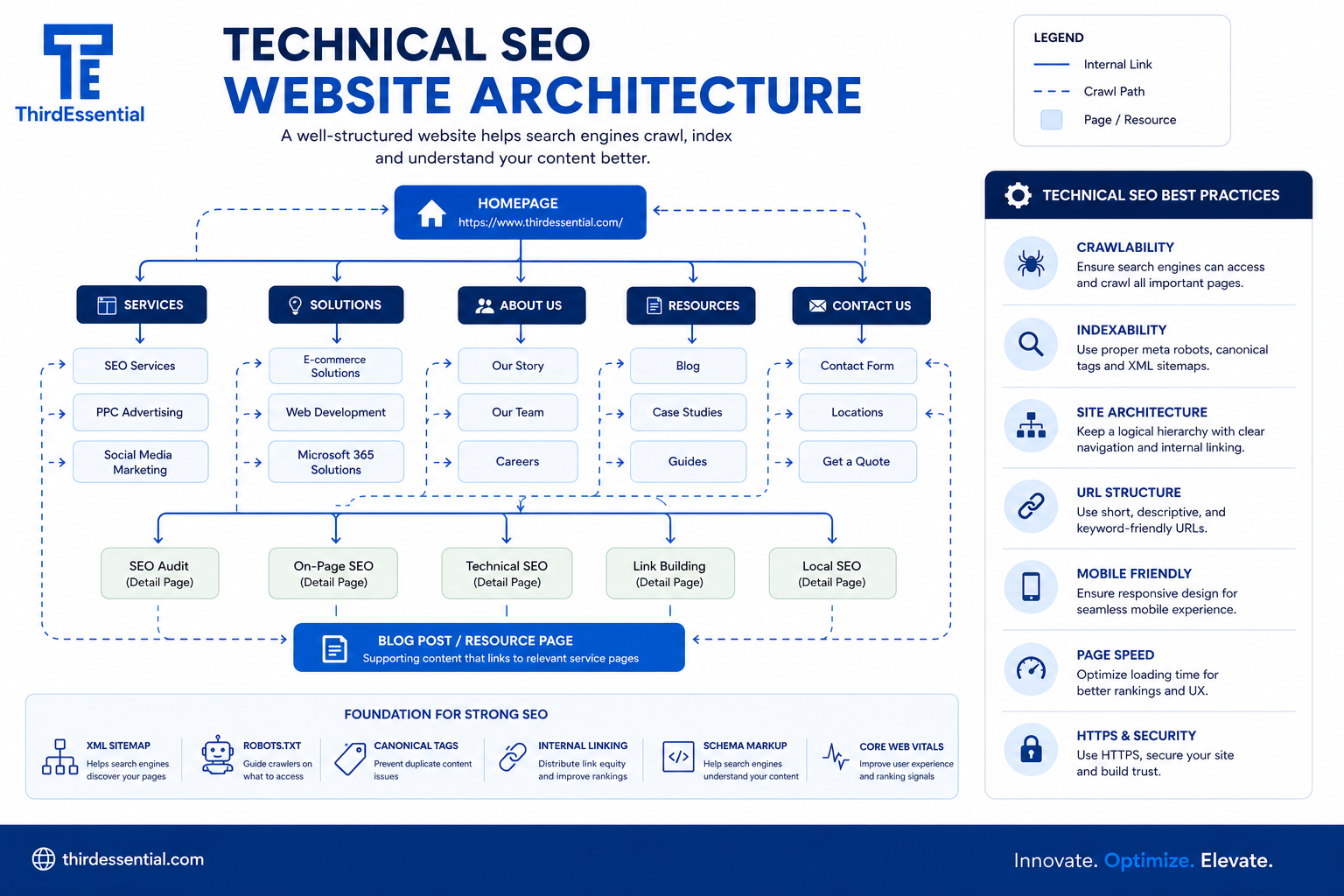
Focus on Website Architecture
Think of your website like a library.
If books are randomly placed without categories, finding anything becomes frustrating.
Search engines face a similar challenge.
A clear website architecture helps Google discover pages faster while helping visitors navigate naturally.
A healthy structure usually includes:
- Logical navigation
- Descriptive URLs
- XML sitemap
- Breadcrumbs
- Organized service pages
- Clean internal hierarchy
Businesses investing in professional web development services in Indore often benefit from SEO-friendly architecture from the beginning rather than trying to repair structural issues later.
Improve Crawlability
Not every page deserves Google’s attention.
Search engines have limited crawl resources.
Duplicate pages, unnecessary archives, broken links, parameter URLs, and poorly managed redirects waste crawl budget.
Regular technical audits should identify:
- Broken links
- Redirect chains
- Duplicate content
- Missing canonicals
- Crawl errors
- Indexing issues
Google Search Console is usually the first place to investigate these problems.
HTTPS Isn’t Optional
HTTPS has been a confirmed ranking signal for years.
More importantly, users expect secure websites.
If browsers display security warnings, trust disappears almost instantly.
Whether you’re running an online store or a simple business website, secure connections are now a basic expectation rather than an added feature.
Common Mistake
Many businesses redesign their website without considering URL structure.
Months later, they discover hundreds of rankings disappeared because redirects weren’t implemented correctly.
SEO should be involved before development begins—not after launch.
Summary
Build clean website architecture
Improve crawlability
Secure every page with HTTPS
Monitor indexing through Search Console
Fix technical issues before publishing more content
2. Create Content Around Search Intent, Not Just Keywords
Keyword research has changed.
Years ago, finding high-volume keywords was enough to build a content strategy.
That approach doesn’t work nearly as well anymore.
Google has become much better at understanding what users actually want.
Two people can search similar phrases while expecting completely different answers.
Consider these searches:
- best CRM software
- CRM software pricing
- CRM implementation consultant
They look related.
Their intent isn’t.
One person is researching.
Another is comparing.
The third may be ready to hire someone.
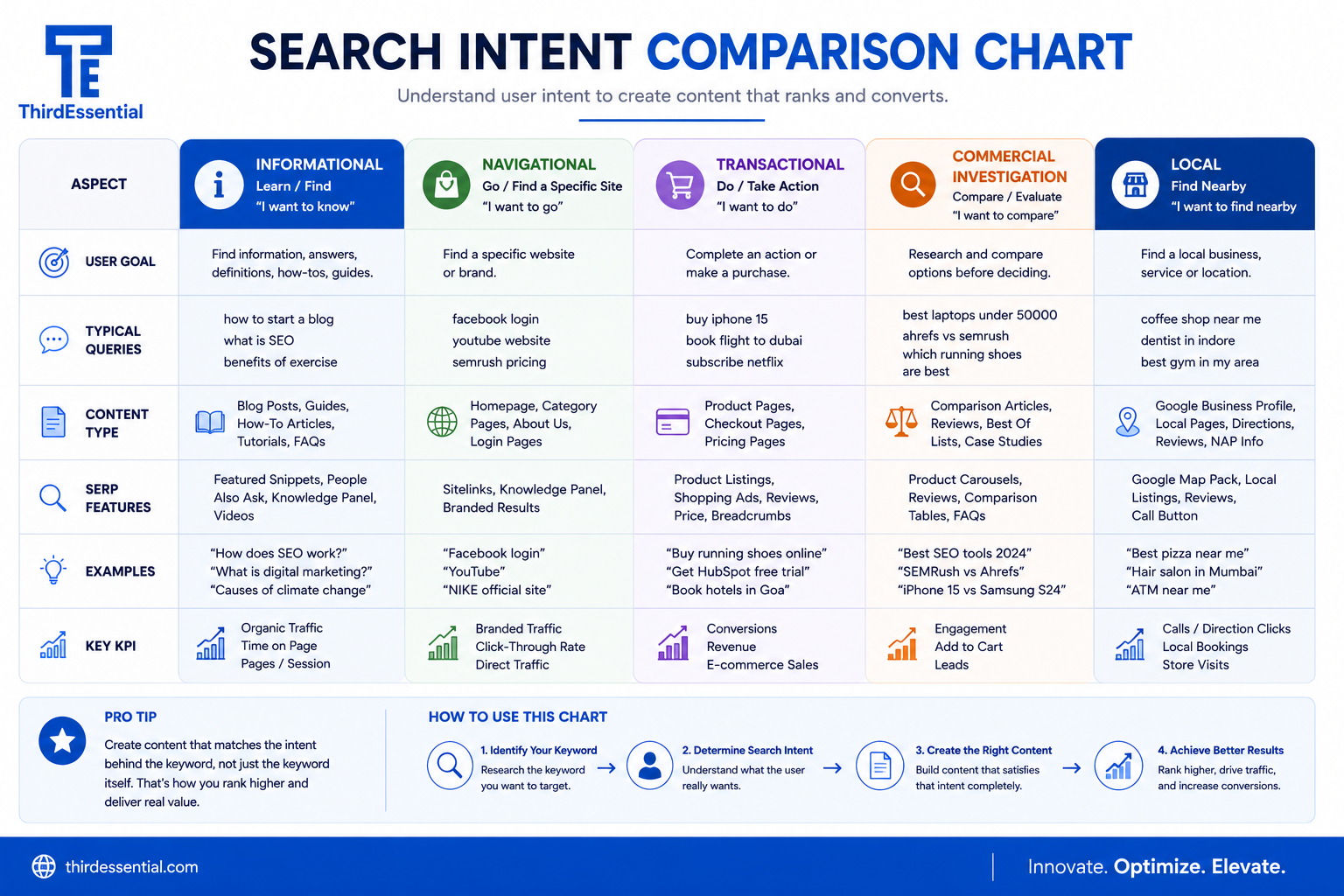
Successful SEO begins by identifying the purpose behind every search.
The Four Main Types of Search Intent
|
Intent |
Example |
Best Content |
| Informational | What is SEO? | Guides, blogs |
| Commercial | Best SEO agency | Comparisons |
| Transactional | Hire SEO expert | Service pages |
| Navigational | ThirdEssential SEO | Brand pages |
Trying to satisfy multiple intents on one page often results in satisfying none of them well.
Why Intent Matters More Than Keyword Density
Google’s systems increasingly evaluate whether a page solves the searcher’s problem.
That’s why pages with fewer keyword repetitions sometimes outrank pages that are heavily optimized.
The winning page simply answers the question better.
Practical Tip
Before writing any article, search your target keyword and study the first page.
Ask yourself:
- What format dominates?
- Are results mostly guides?
- Lists?
- Videos?
- Product pages?
- Local businesses?
Google is already showing you what users expect.
Match that expectation before trying to outperform it.
Information Gain Matters More Than Ever
Publishing another article that repeats existing advice rarely earns strong rankings.
Instead, ask:
“What can I explain that the current top results don’t?”
That could include:
- implementation challenges
- decision frameworks
- cost comparisons
- prioritization advice
- common mistakes
- practical examples
This concept—often called information gain—helps create content that’s genuinely worth ranking.
Summary
Target user intent first
Choose one primary intent per page
Study existing search results
Add original insights
Focus on solving problems rather than repeating keywords
3. Improve Page Experience Before Looking for More Traffic
A common assumption is that poor rankings are caused by weak content.
Sometimes that’s true.
Other times, the content is perfectly useful—but the experience of consuming it isn’t.
People leave because the page loads slowly, jumps while loading, hides important information behind pop-ups, or simply feels difficult to use.
Google has spent years encouraging website owners to improve these aspects through its Page Experience signals and Core Web Vitals. While great content remains the stronger ranking factor, a frustrating user experience can still reduce engagement and conversions.
Core Web Vitals: What They Measure
Core Web Vitals focus on three aspects of page performance:
| Metric | Measures |
Why It Matters |
| Largest Contentful Paint (LCP) | Loading speed | Users shouldn’t wait for the main content to appear. |
| Interaction to Next Paint (INP) | Responsiveness | Pages should react quickly when visitors click or type. |
| Cumulative Layout Shift (CLS) | Visual stability | Buttons and text shouldn’t move unexpectedly while loading. |
Improving these metrics isn’t just about pleasing Google. Faster, more stable websites generally keep visitors engaged for longer.
4. Build Topical Authority Instead of Publishing Random Blogs
There’s a misconception that publishing more blog posts automatically leads to better rankings.
It doesn’t.
A website with 300 average articles often loses to one with 40 exceptionally useful resources covering a subject in depth.
Google wants confidence that your website understands a topic—not that it mentions it occasionally.
That’s where topical authority comes in.
What Is Topical Authority?
Topical authority is built when your website covers a subject comprehensively instead of relying on isolated articles.
For example, if your business offers SEO services, don’t stop at writing a single guide on SEO techniques.
Create supporting content around:
- Technical SEO
- Local SEO
- On-page SEO
- Off-page SEO
- Core Web Vitals
- Google Search Console
- Keyword Research
- Website Audits
- Content Marketing
- Schema Markup
- Internal Linking
- AI Search Optimization
Together, these pages reinforce each other and signal expertise.
Build Content Clusters
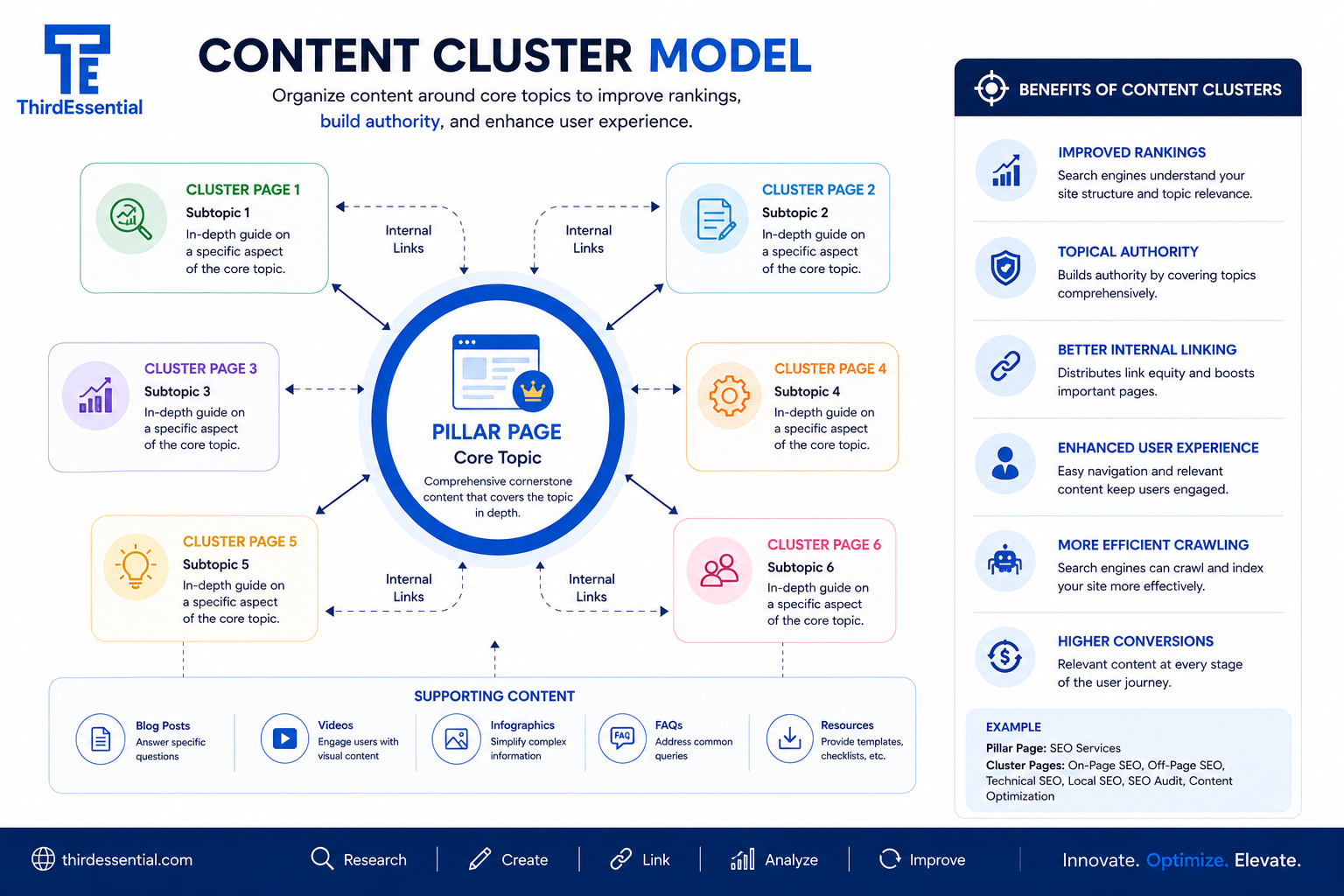
Rather than publishing disconnected articles, organize content into clusters.
| Pillar Page | Supporting Content |
| Complete SEO Guide | Keyword Research |
| Complete SEO Guide | Technical SEO Checklist |
| Complete SEO Guide | Local SEO Guide |
| Complete SEO Guide | Core Web Vitals Explained |
| Complete SEO Guide | Internal Linking Strategy |
Each supporting article links back to the pillar page and to other relevant resources.
This structure helps search engines understand the relationship between your content while making it easier for readers to explore a topic in depth.
Common Mistake
Many businesses publish content based only on what’s trending.
Trending topics can bring short-term traffic, but if they don’t relate to your services or expertise, they rarely contribute to long-term authority.
Prioritize evergreen content first. Add trend-based articles only when they’re genuinely relevant to your audience.
Quick Checklist
Build pillar pages
Create supporting articles
Keep topics closely related
Update older content regularly
5. Make Internal Linking Work Harder
Internal links are often added as an afterthought.
They deserve much more attention.
A thoughtful internal linking strategy helps search engines discover content, understand page relationships, and distribute authority across your website.
For readers, internal links answer the next logical question.
Imagine someone reading about SEO. Their next question might be:
“How do I improve my website’s technical performance?”
That’s a natural place to reference web development services in Indore if the discussion shifts toward building faster, search-friendly websites from the ground up.
Likewise, while discussing user engagement and retention, mentioning custom mobile app development can make sense when explaining how businesses create consistent experiences beyond the browser.
The key is relevance.
Never insert internal links simply because you want another page indexed.
Internal Linking Best Practices
- Link naturally within paragraphs.
- Use descriptive anchor text.
- Prioritize pages with business value.
- Avoid linking the same anchor repeatedly on one page.
- Fix orphan pages that receive no internal links.
- Review links after publishing new content.
Common Mistake
Some websites place dozens of internal links in every article.
More isn’t better.
Too many links dilute relevance and make content harder to read.
If every paragraph contains three links, readers stop noticing them altogether.
Summary
Link where readers genuinely benefit
Connect related topics
Review internal links regularly
Avoid keyword stuffing through anchor text
6. Add Structured Data to Help Search Engines Understand Your Content
Structured data doesn’t guarantee higher rankings.
That’s an important distinction.
What it does is help search engines interpret your content more accurately, which may improve how your pages appear in search results.
Schema markup provides additional context.
Instead of simply seeing a page, Google can recognize whether it’s:
- An article
- A service
- An FAQ
- A product
- A local business
- An event
- A review
This extra context can increase eligibility for rich results.
Types of Schema Worth Implementing
| Schema Type | Best Used For |
|
Article |
Blog posts |
| FAQ |
Frequently asked questions |
|
Organization |
Company information |
|
Local Business |
Local SEO |
| Breadcrumb |
Navigation |
| Product |
E-commerce |
Don’t Overdo It
Schema should accurately reflect what’s on the page.
Adding FAQ schema without visible FAQs or using review schema for self-written testimonials violates Google’s guidelines and may prevent rich results.
Use structured data honestly.
7. Focus on User Experience, Not Just Rankings
Imagine two websites offering identical services.
One loads quickly.
Navigation is obvious.
The contact form works.
Buttons are easy to find.
The other…
Takes eight seconds to load.
Pop-ups appear immediately.
Menus are confusing.
Which business feels more trustworthy?
That’s why user experience indirectly supports SEO.
People stay longer, interact more, and are more likely to convert.
Working with an experienced UI/UX design agency can help businesses identify friction points that analytics alone don’t reveal, such as confusing navigation paths or unnecessary steps during enquiries.
Accessibility Matters Too
Accessibility isn’t only about compliance.
It’s about ensuring everyone can use your website.
Simple improvements include:
- Descriptive alt text
- Proper heading hierarchy
- Keyboard navigation
- Readable colour contrast
- Meaningful link text
Accessible websites often become better websites for everyone.
Quick Checklist
Improve readability
Simplify navigation
Reduce unnecessary clicks
Optimize forms
Improve accessibility
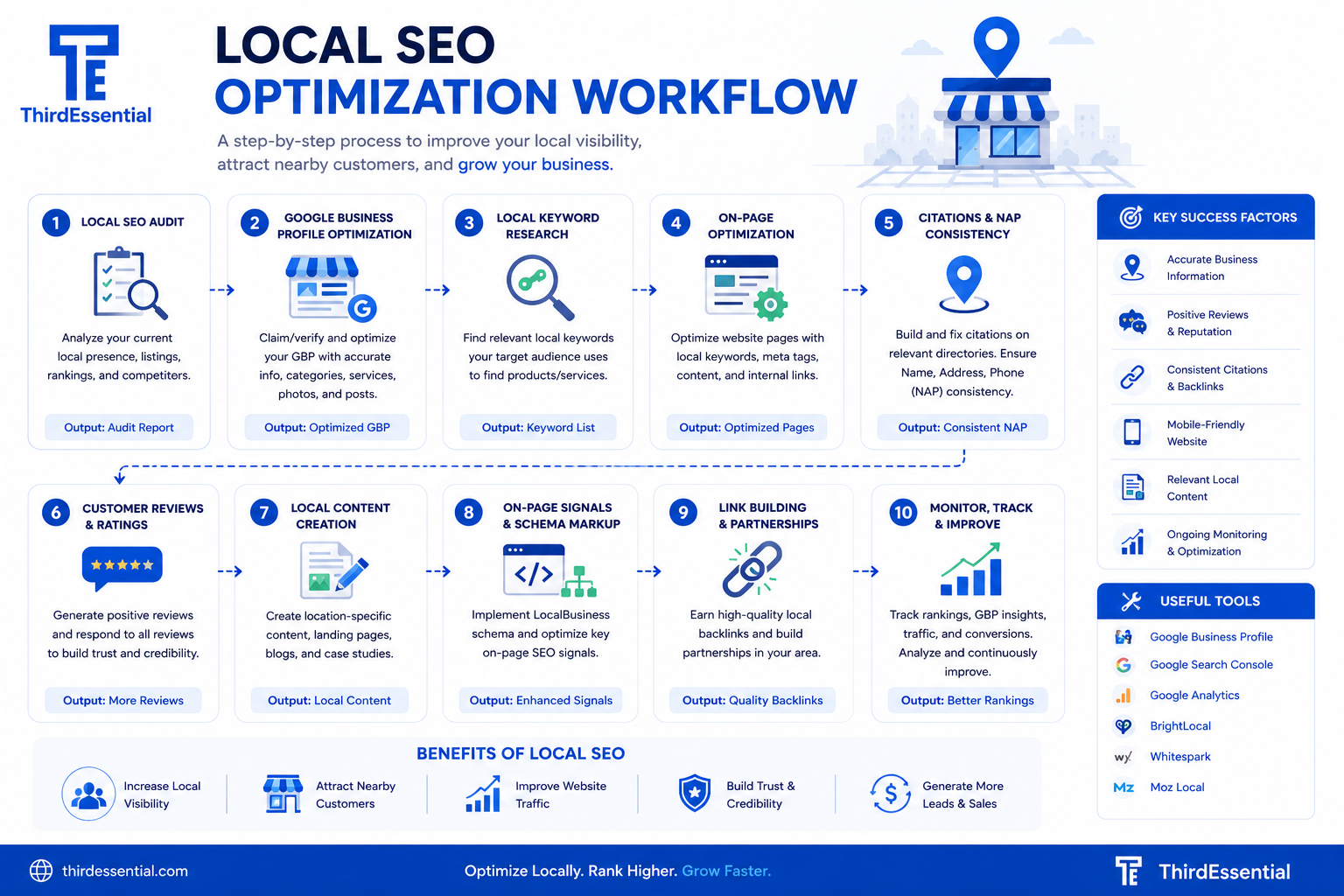
8. Strengthen Local SEO If You Serve a Specific Area
A business serving customers in one city doesn’t need visitors from every country.
It needs visibility where potential customers actually are.
That’s the purpose of Local SEO.
Key Areas to Focus On
Optimize Google Business Profile
An accurate and regularly updated Google Business Profile increases your chances of appearing in local search results and Google Maps.
Keep information consistent across every platform.
Include:
- Business hours
- Categories
- Contact details
- Photos
- Services
- Customer reviews
Create Location-Relevant Content
Rather than stuffing city names into every paragraph, produce genuinely useful local content.
Businesses offering digital marketing services in Indore, for example, can publish guides about local consumer behaviour, regional market trends, or digital advertising opportunities specific to Central India.
That’s significantly more valuable than repeating “Indore” twenty times.
Local SEO Checklist
Optimize Google Business Profile
Collect authentic reviews
Build local citations
Maintain NAP consistency
Publish local content
9. Keep Your Website Healthy After Launch
Launching a website isn’t the end of the project.
It’s the beginning.
Over time:
Plugins become outdated.
Security vulnerabilities appear.
Links break.
Pages slow down.
Content becomes inaccurate.
Ignoring these issues gradually affects user trust and search performance.
Businesses using website maintenance services typically stay ahead of these problems through regular updates, backups, uptime monitoring, and performance checks.
Preventive maintenance is almost always less expensive than recovering from a hacked or broken website.
Monthly Website Maintenance Checklist
|
Task |
Frequency |
| Update plugins |
Monthly |
| Update WordPress core |
Monthly |
| Check backups |
Weekly |
| Fix broken links |
Monthly |
| Review Search Console errors |
Monthly |
| Monitor Core Web Vitals |
Monthly |
| Scan for malware |
Weekly |
10. Measure Results and Keep Improving
SEO isn’t something you complete once.
Search behaviour changes.
Competitors publish new content.
Google updates its systems.
Businesses launch new products.
The websites that continue improving usually outperform those left untouched.
Measure What Actually Matters
Instead of obsessing over rankings alone, monitor:
- Organic traffic
- Qualified leads
- Conversion rate
- Click-through rate
- Indexed pages
- Core Web Vitals
- Revenue from organic search
Higher rankings mean little if they don’t contribute to business growth.
Build Helpful Digital Tools
Not every valuable SEO asset is a blog post.
Interactive calculators, checklists, browser utilities, and productivity tools naturally attract backlinks and repeat visitors because they solve real problems.
For businesses targeting niche audiences, browser extension development can support long-term brand visibility by creating practical tools users return to regularly. While this won’t replace a strong content strategy, it can complement one by earning mentions and links that purely informational content often doesn’t.
Prioritization Framework
If you’re starting from scratch, tackle SEO in this order:
|
Priority |
Focus Area |
Impact |
|
1 |
Technical SEO & Indexing | Very High |
|
2 |
Website Speed & Core Web Vitals | High |
|
3 |
Search Intent & Content Quality | Very High |
|
4 |
Internal Linking | High |
|
5 |
Structured Data | Medium |
|
6 |
Local SEO | High (for local businesses) |
|
7 |
Content Clusters | High |
|
8 |
Ongoing Maintenance | High |
|
9 |
Authority Building | Long-term |
|
10 |
Continuous Measurement | Essential |
Key Takeaways
Before moving to the FAQs, here’s a practical summary of the strategies discussed:
- Build a technically sound website before scaling content.
- Match every page to a clear search intent.
- Improve Core Web Vitals and overall page experience.
- Create content clusters to establish topical authority.
- Use internal links to guide users and distribute authority naturally.
- Implement structured data where it’s appropriate.
- Optimize for local search if your customers are geographically focused.
- Maintain your website regularly to prevent technical issues.
- Measure SEO success using business outcomes—not rankings alone.
- Treat SEO as an ongoing process rather than a one-time project.
Frequently Asked Questions
1. Is SEO still worth investing in if I’m already running Google Ads?
Yes. SEO and Google Ads serve different purposes. Paid ads can generate traffic immediately, but they stop producing results when the budget runs out. SEO takes longer to build momentum, yet it can continue attracting qualified visitors over time. Businesses often see the strongest results when both channels support each other rather than compete.
2. How often should I update my website’s content?
There’s no universal schedule, but reviewing important pages every six to twelve months is a good practice. Update statistics, replace outdated examples, improve internal links, and expand sections where competitors provide more value. If your industry changes quickly, quarterly reviews may be more appropriate.
3. Can a new website rank on Google quickly?
A new website can begin appearing in search results within days or weeks after indexing, but earning competitive rankings usually takes longer. The timeline depends on factors such as competition, website quality, topical authority, backlinks, and how consistently useful content is published.
4. What’s the difference between Technical SEO and On-Page SEO?
Technical SEO focuses on how search engines crawl, index, and understand your website. It includes areas such as website architecture, page speed, structured data, HTTPS, canonical tags, and mobile usability.
On-page SEO focuses on the content itself—headings, keywords, search intent, internal links, metadata, and content quality.
Both are essential. Strong content can’t compensate for serious technical issues, and perfect technical SEO won’t help if the content doesn’t answer users’ questions.
5. Do backlinks still matter?
Yes, but quality matters far more than quantity.
Links from trusted, relevant websites continue to be a strong authority signal. Buying low-quality backlinks or participating in link schemes can do more harm than good. The most sustainable approach is creating genuinely useful resources that other websites naturally reference.
6. What is the biggest SEO mistake businesses make?
Many businesses focus on publishing more content without fixing underlying technical or strategic issues.
Common examples include:
- Slow-loading websites
- Poor mobile experience
- Weak internal linking
- Publishing articles without understanding search intent
- Ignoring Google Search Console
- Never updating older content
Improving these fundamentals often produces better results than simply increasing publishing frequency.
7. How important are Core Web Vitals?
Core Web Vitals are one part of Google’s broader Page Experience considerations. While they aren’t the only ranking factor, they directly affect how visitors experience your website. Faster, more responsive pages generally improve engagement, reduce abandonment, and support stronger conversion rates.
8. What should I measure to know if my SEO strategy is working?
Avoid judging success by rankings alone.
Instead, monitor:
- Organic traffic growth
- Qualified enquiries
- Conversion rate
- Click-through rate (CTR)
- Indexed pages
- Search visibility
- Time on page
- Revenue generated through organic search
The ultimate goal isn’t simply to rank higher—it’s to generate meaningful business outcomes.
Final Thoughts
SEO has become more sophisticated, but the core principle hasn’t changed.
Websites that provide clear answers, deliver a good user experience, and demonstrate genuine expertise consistently outperform those built around shortcuts or outdated tactics.
If you’re planning your SEO roadmap, don’t try to improve everything at once.
Start with the technical foundation.
Make sure your website is easy to crawl, fast to load, and simple to use. Build content around real customer questions. Strengthen internal links, improve topical coverage, and measure progress using meaningful business metrics instead of chasing rankings alone.
Over time, these improvements reinforce one another. Better website performance leads to better user engagement. Better engagement supports stronger search visibility. Stronger visibility creates more opportunities to generate qualified leads and build lasting brand authority.
SEO isn’t a one-time project.
It’s an ongoing process of making your website more useful than it was yesterday.
How ThirdEssential Can Help
Whether you’re launching a new website, improving an existing one, or looking to strengthen your organic search performance, having the right technical and strategic foundation makes a measurable difference.
At ThirdEssential, we combine web development, user experience, technical SEO, content strategy, and digital marketing to help businesses build websites that don’t just attract visitors—they support long-term growth.
If you’re evaluating your current website, start with an SEO audit. Identifying the biggest opportunities first often delivers far better returns than making random improvements.